Damage Outbound
A damage outbound writes damaged, expired or unsellable products off your stock. When it's approved, the quantities are removed from stock at the For Location.
Menu: Purchase and Other Expense › Damage Outbound
For buttons, statuses and approvals shared by all transactions, see Working with transactions.
How to write off damaged products
The quickest way is from an approved Damage transaction. See How to write off the stock.
To create one here:
- Open Purchase and Other Expense › Damage Outbound and click ⊕ (Add New Transaction).
- Fill in Created For, For Location, Request by, Reason and Remarks.
- Choose how to add products:
- Direct: add the products yourself.
- From Invoice: pick an approved Damage transaction and click Import.
- Click Save ▾ and choose Save, Approve or Approve and Print.
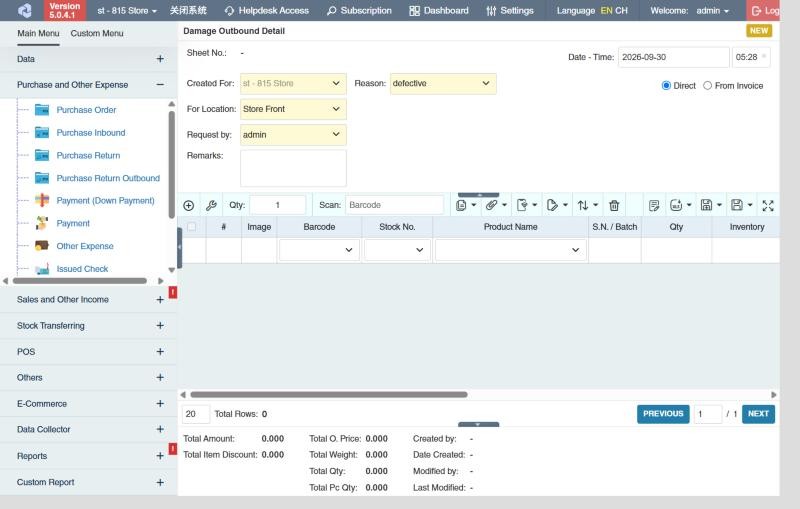
Once approved, the stock is reduced. To undo it, Revert the outbound (requires Purchase and Other Expense › Damage Outbound › Revert).
What approval does
- Stock goes down at the For Location; serial numbers and batches you choose leave stock.
- The damage transaction's remaining quantities go down.
- The cost of the goods is counted as Damage in the Income Statement, and the lines appear in the Detail Damage Outbound Report with their Reason.
Example
The approved damage for 12 dented cans and 5 expired yogurts is imported into a damage outbound, the Reason is copied, and it's approved when the goods are thrown away: stock drops by 12 and 5, and 540.00 at cost is written off.
Settings that affect this module
Your administrator can change these in Settings (see About settings). Click a section to see the choices.
Generic Settings › Damage Outbound
- Warn if inventory reaches minimum?
- Auto-print after Save?
- Set the default printout template for this transaction module
Generic Settings › Purchase Inbound
Branch Settings › General
Other permissions for this module
| Permission | Allows you to |
|---|---|
| Purchase and Other Expense › Damage Outbound › Approve | Approve damage outbounds, which removes the stock |
| Purchase and Other Expense › Damage Outbound › Show Cost | See product costs |
| Purchase and Other Expense › Damage Outbound › View Other Users' Transaction | See damage outbounds created by other users |