Stock Requests (To Other Branches)
A stock request asks another branch to send products to your branch. It doesn't move any stock itself. The other branch sees your request and delivers against it.
Menu: Stock Transferring › Stock Requests (To Other Branches)
- Your branch creates a stock request (this page).
- The supplying branch sees it in Stock Requests (From Other Branches) and creates a Stock Delivery Outbound. Approving the outbound takes the stock out of their branch.
- Your branch receives the goods with a Stock Delivery Inbound. Approving it adds the stock to your branch.
For buttons, statuses and approvals shared by all transactions, see Working with transactions.
How to request stock from another branch
-
Open Stock Transferring › Stock Requests (To Other Branches) and click ⊕ (Add New Transaction).
-
Fill in:
Field What to enter Created For Your branch. For Location The location in your branch that needs the stock. Request by The user making the request. Request To The branch you're requesting from. Remarks Optional notes. -
Add the products and quantities (see How to add products).
tipTo request what you've sold, use Copy ▾ › Import Sales Outbound in the toolbar. Choose the Transaction Date range (or a Sheet Number range with its Sheet Number Prefix) and the Approval Status, and CIRMS adds the products from those sales outbounds.
-
Click Save ▾ and choose Save, Approve or Approve and Print.
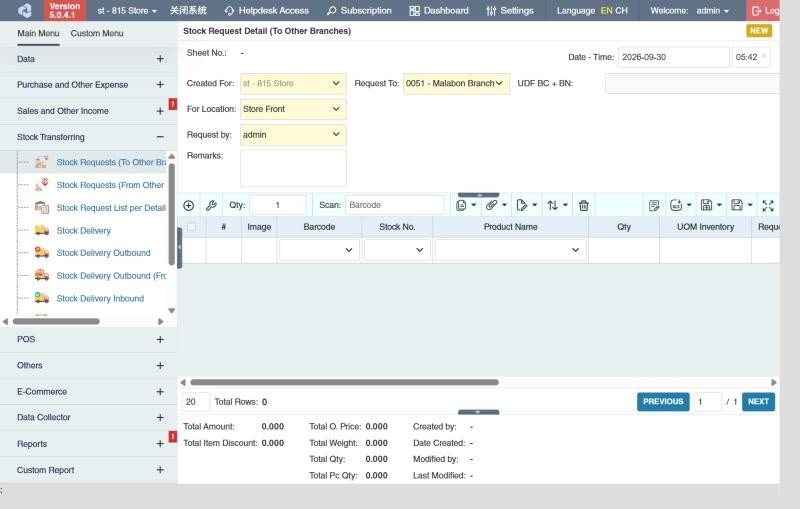
Once approved, the request appears in the other branch's Stock Requests (From Other Branches).
Example: moving stock from the warehouse to a store
The full flow, from Store 2 asking to Store 2 receiving:
| Step | Who | Transaction | Stock at the warehouse | Stock at Store 2 |
|---|---|---|---|---|
| 1 | Store 2 | Stock request to the warehouse: 48 Bath Towels | 300 (48 now counted as requested for Store 2) | 5 |
| 2 | Warehouse | Stock Delivery from the request, approved: the towels are reserved | 300 (48 reserved) | 5 |
| 3 | Warehouse | Stock Delivery Outbound, approved when the truck leaves | 252 | 5 (48 in transit) |
| 4 | Store 2 | Stock Delivery Inbound, approved on arrival | 252 | 53 |
If only 40 towels arrive, Store 2 receives 40; the remaining 8 stay open on the outbound and show in the Pending Stock Delivery Outbound Report until they're found or written off. Small branches often skip steps 1 and 2 and create the outbound directly.
Settings that affect this module
Your administrator can change these in Settings (see About settings). Click a section to see the choices.
Generic Settings › Product
Generic Settings › Purchase
Generic Settings › Sales and Other Income
Generic Settings › Stock Request
- Warn if inventory exceeds maximum?
- Check to turn on the following warnings for repeated requests. Indicate duration of warning (in days) in the textbox for system to verify the existing product within the duration.
- Auto-print after Save?
- Set the default printout template for this transaction module
- Enable transaction reminder popup for products with pending remaining request qty's to deliver.
Branch Settings › Stock Request
Other permissions for this module
| Permission | Allows you to |
|---|---|
| Stock Transferring › Stock Requests (To Other Branches) › Approve | Approve stock requests |
| Stock Transferring › Stock Requests (To Other Branches) › Revert | Revert them back to draft |
| Stock Transferring › Stock Requests (To Other Branches) › Clear Undelivered Transactions | Close requests that won't be fully delivered |
| Stock Transferring › Stock Requests (To Other Branches) › View Other Users' Transaction | See requests created by other users |