Damage
A damage transaction lists products that are damaged, expired or otherwise unsellable, with a Reason.
A damage transaction does not change stock
Stock goes down only when you approve a Damage Outbound. You can skip this module and create a Damage Outbound directly.
Menu: Purchase and Other Expense › Damage
For buttons, statuses and approvals shared by all transactions, see Working with transactions.
How to report damaged products
Required permission
Purchase and Other Expense › Damage › Create
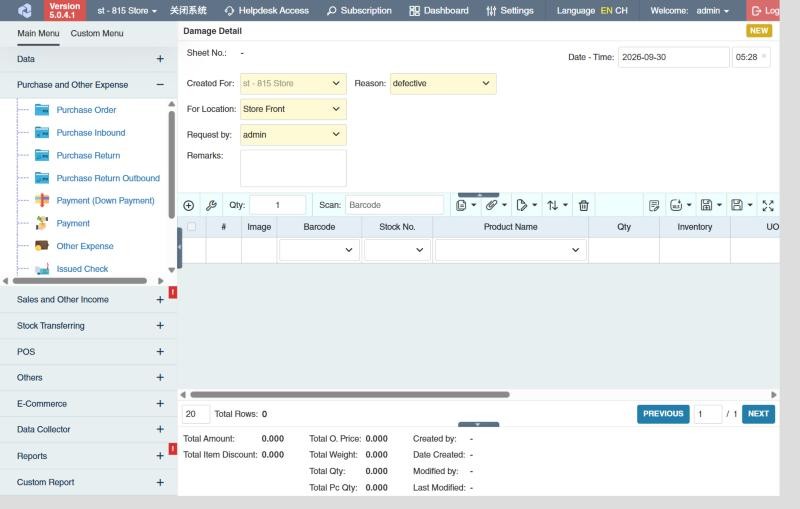
- Open Purchase and Other Expense › Damage and click ⊕ (Add New Transaction).
- Fill in Created For, For Location (where the damaged goods are), Request by and Remarks.
- Choose the Reason. Your administrator maintains the list of reasons in Data › Reason.
- Add the damaged products and quantities (see How to add products).
- Click Save ▾ and choose Save, Approve or Approve and Print.
How to write off the stock (create a Damage Outbound)
Required permission
Purchase and Other Expense › Damage Outbound › Create
- In the damage list, tick the approved damage transactions.
- Click the Create Damage Outbound icon in the toolbar.
- Check the quantities and choose the Approval Status of the new outbound: Draft or, if you can approve damage outbounds, Approved.
- Click the 🧺 (create) button.
Approve the new Damage Outbound to remove the goods from stock. See Damage Outbound.
Example
During the morning check, staff find 12 dented cans of Evaporated Milk and 5 expired Yogurt cups in the store:
- Create a damage transaction for the store location with Reason Dented / Expired, add the 12 cans and 5 cups, and submit it For Approval. The goods are now reserved, so they aren't sold or transferred by mistake.
- The supervisor checks the items and approves.
- When the goods are thrown away or returned, create the damage outbound from it and approve: stock goes down by 12 and 5, and their cost appears as Damage in the Income Statement.
Settings that affect this module
Your administrator can change these in Settings (see About settings). Click a section to see the choices.
Generic Settings › Damage
- Warn if inventory reaches minimum?
- Auto-print after Save?
- Set the default printout template for this transaction module
Other permissions for this module
| Permission | Allows you to |
|---|---|
| Purchase and Other Expense › Damage › Approve | Approve damage transactions |
| Purchase and Other Expense › Damage › Revert | Revert them back to draft |
| Purchase and Other Expense › Damage › Show Cost | See product costs |
| Purchase and Other Expense › Damage › View Other Users' Transaction | See damage transactions created by other users |