Barcode Template
Barcode templates define what's printed on a barcode sticker and its size, for example the barcode, product name and price on a 30 × 25 mm label.
Menu: Others › Templates › Barcode Template
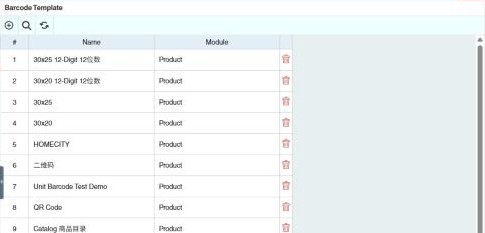
How to create a barcode template
Required permission
Others › Barcode Template › Create
- Open Others › Barcode Template and click ⊕ (Add New Printout Template).
- Enter a Name (tip: include the sticker size) and choose the Module.
- Start from an existing template with Copy, or from blank with Clear.
- Arrange the fields on the sticker, then check with Print Preview and save.
Choose the template when you use Barcode Print. See Barcode Printing.
Example
The store buys 40 × 30 mm sticker rolls. Create a template of that size with the product name, retail price and barcode, and choose it when printing from Barcode Printing.
Other permissions for this module
| Permission | Allows you to |
|---|---|
| Others › Barcode Template › Update | Change templates |
| Others › Barcode Template › Delete | Delete templates |