Sales Return Inbound
A sales return inbound records goods a customer has returned. When it's approved, the quantities are added back to stock at the For Location, and the amount is credited to the customer.
Menu: Sales and Other Income › Sales Return Inbound
For buttons, statuses and approvals shared by all transactions, see Working with transactions.
How to receive returned goods
The quickest way is from an approved Sales Return. See How to receive the goods back.
To create one here:
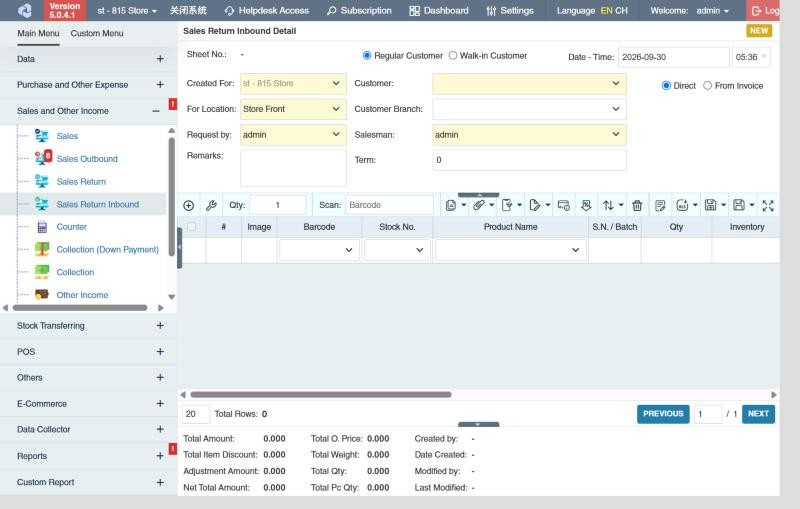
- Open Sales and Other Income › Sales Return Inbound and click ⊕ (Add New Transaction).
- Choose Regular Customer or Walk-in Customer, and fill in Customer (or Walk-in Name), Customer Branch, Salesman, Term and Remarks.
- Choose how to add products:
- Direct: add the products yourself.
- From Invoice: pick an approved Sales Return and click Import.
- Click Save ▾ and choose Save, Approve or Approve and Print.
The returned amount reduces what the customer owes. In Collection, add the inbound with the Sales Return Inbound Selector to deduct it from a payment.
What approval does
- Stock goes up at the For Location; returned serial numbers become available again.
- The customer's balance goes down by the return's amount, or it can be deducted in the next Collection or Counter.
- The sales return's remaining quantities go down, and the return shows in the Return line of the Income Statement.
Example
The 10 wet sacks of rice come back from ABC Grocery: import the approved sales return, check the 10 sacks and approve. The rice goes to the stockroom (choose it as For Location), where it can later be written off with a Damage or returned to the supplier.
Settings that affect this module
Your administrator can change these in Settings (see About settings). Click a section to see the choices.
Generic Settings › Sales and Other Income
- Hide all Sales & Collection Transactions before the specified date?
- Allow negative qty (as Returns) in Sales and Sales Outbound
- For sales transaction, restrict products with "Zero" prices
Generic Settings › Sales Return Inbound
- Auto-print after Save?
- Set the default printout template for this transaction module
- For sales return transaction, restrict product serials to be transacted across branches?
Generic Settings › Sales Return
- Allow to create sales return transaction without referencing of sales outbound transaction
- Allow to create return inbound transaction without reference sales return.
Branch Settings › Collection
Other permissions for this module
| Permission | Allows you to |
|---|---|
| Sales and Other Income › Sales Return Inbound › Approve | Approve inbounds, which adds the stock back |
| Sales and Other Income › Sales Return Inbound › Revert | Revert inbounds back to draft |
| Sales and Other Income › Sales Return Inbound › Edit Price | Change the price on a row |
| Sales and Other Income › Sales Return Inbound › View Other Users' Transaction | See inbounds created by other users |